











Projects · Tools & libraries

IBus Mozc System かな入力の仕組み
Scripts and X11/XFCE configuration that make Japanese input with IBus and Mozc work reliably on a keyboard with no Japanese keys.
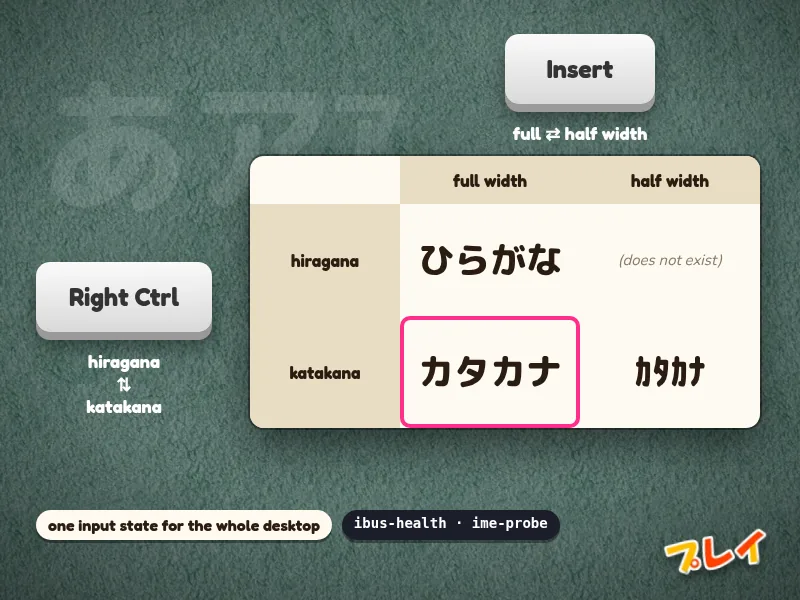
              full-width   half-width
hiragana      ひらがな     (does not exist)
katakana      カタカナ     カタカナ

Right Ctrl -> hiragana / katakana
Insert     -> full / half width
IBus and Mozc work, until they don't: the input state drifts between windows, the candidate box gets stuck on screen, and some apps silently ignore the input method. This set of tools fills the gaps between IBus, Mozc, X11 and XFCE.
- Two keys, two axes. Right Ctrl switches hiragana and katakana, Insert switches full and half width. One press each, from any state, even mid-conversion.
- One input state for the whole desktop, tracked by a small follower process, so every window types the same way until you change it.
- A supervisor that brings the IBus/Mozc stack up and keeps it alive, plus read-only diagnostics (
ibus-health,ime-probe) that tell you why an app isn't taking input. mozc-keymapedits Mozc's keymap from the command line, no GUI needed.