








Projects · What I'm known for

Lexiglance どこでも辞書
System-wide pop-up dictionary for Linux (X11) and Windows. Hold a key, point at a word in any application, even in a game or a video, and see its definitions.
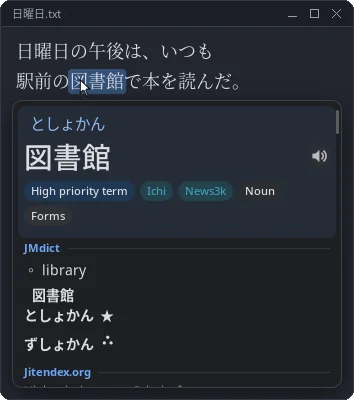
2 photos
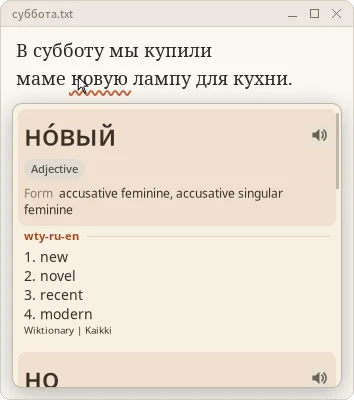
Russian, with deinflection (paper theme) 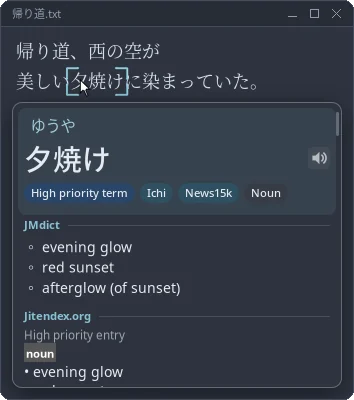
夕焼け with corner brackets (Nord theme)
Pop-up dictionaries are great for learning a language, but they only work inside the browser. Lexiglance works everywhere: hold Super + Left Alt, point at a word, and a popup shows its reading and definitions. Scroll to select more or fewer characters, and hold Shift to get the whole sentence translated.
Try hovering these: 図書館 · 夕焼け · 食べさせられなかった
What makes it work#
- Reading text from anywhere. It asks the accessibility layer first (AT-SPI on Linux, UI Automation on Windows) and falls back to OCR with PaddleOCR or Tesseract for games, images and videos that expose no text.
- Fast lookups. Dictionaries in the Yomitan format are compiled into memory-mapped indexes, so a lookup is a few page faults, not a JSON parse.
- Deinflection. 食べさせられなかった finds 食べる, книгами finds книга. Each language is a small JSON rule file, and new languages can be added without rebuilding.
- Offline translation. Whole sentences are translated locally with OPUS-MT models on ONNX Runtime. Nothing you read leaves your computer.
- Safe in games. No input injection and no access to other processes, so it doesn't trip anti-cheat.
- Pronunciation audio, Anki cards through AnkiConnect, themeable popups, a health check with one-click fixes, and a self-updater.
Japanese, Russian, Ukrainian, Korean and Greek are supported today. It ships as a Windows installer, an AppImage, .deb, .rpm and a tarball, built in CI.