





Projects · What I'm known for

Simple Project Tracker
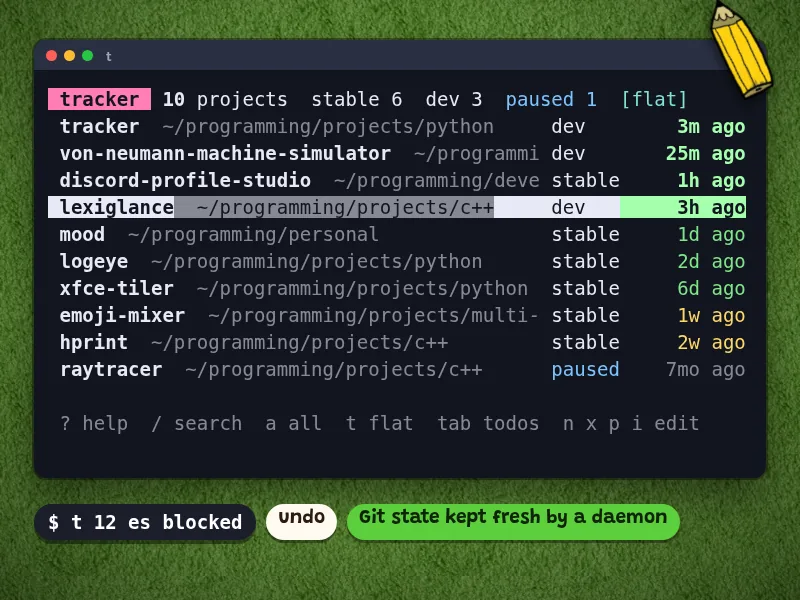
CLI project tracker with Git repository discovery, search and filtering, bulk edits, undo, a todo list, a terminal browser and a background update daemon.
$ t ls
TID | ID | NAME                          | STATUS | LAST TOUCHED | NOTE
--- | -- | ----------------------------- | ------ | ------------ | ---------------------
1   | 8  | tracker                       | dev    | 1m ago       | release 1.0.0 today
2   | 3  | von-neumann-machine-simulator | dev    | 23m ago      | review saturday
3   | 26 | discord-profile-studio        | stable | 1h ago
$ t 12 es blocked
I keep dozens of repositories in ~/programming, and I wanted one command that tells me what state each is in and what I was doing with it. t scans a directory for Git repositories, tracks them in a small database, and lets me attach statuses and notes.
Design choices#
- Commands that read like sentences. The project can go before or after the command, and a command fuses with its action:
t 12 es blockededits the status of project 12,t sset ll 30sets a setting. A bare word falls back to a project lookup. - Frecency-based name resolution when you want it, optionally fed by zoxide:
t trafindstrackerbecause it's what I touch most, not because it sorts first. - Undo. The last change is always one
t undoaway, and undoing again puts it back. - A background daemon keeps Git state fresh so listings are instant, with
doctorandfixcommands to repair the database if it drifts. - A project browser in the terminal: the monitored folders as a tree with statuses and last changes, where projects and todos can be edited and linked with
@mentions. - Several machines. The database can live in Syncthing or Git, paths are stored portably, and each project carries a fingerprint (its root commit), so
doctorspots one project tracked twice. - Shell completion for bash, zsh and fish, a
manpage, and a todo list that lives beside the project database.
~11,600 lines across 45 modules, no dependencies, with 23 test modules and CI. Published on PyPI.